Payment Links for Easier Student Fee Collection
Create payment links for application, admission, tuition, and other fees. Connect every request to the right student and track paid, pending, and outstanding amounts from one place.
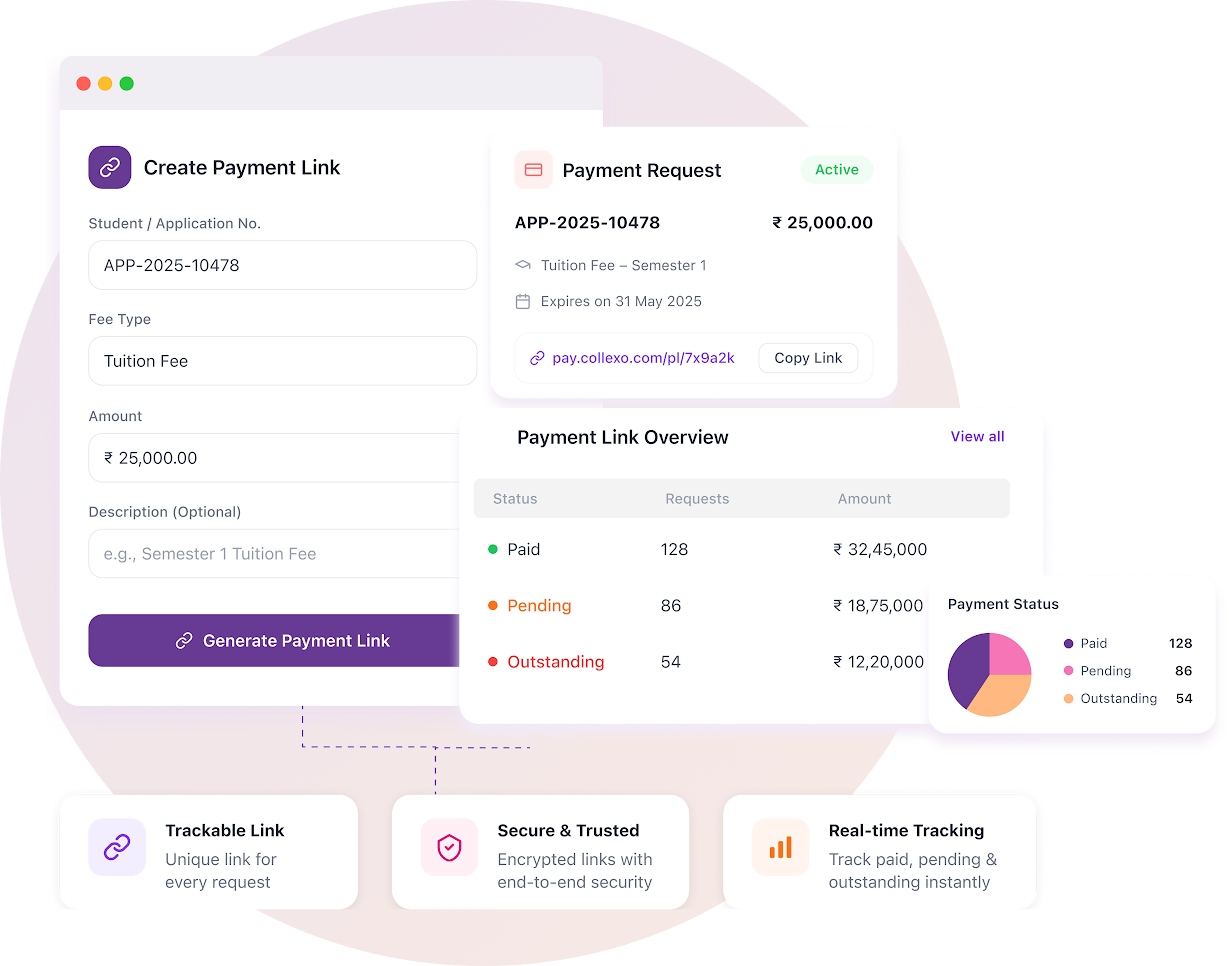
Every payment link stays connected to the student and the fee.
A generic payment link only asks for an amount. Collexo keeps the student, fee purpose, payable amount, instructions and payment status together from request to collection.
- Create a link from a fee already assigned to the student.
- Create a separate one-off request for another institutional charge.
- Add the student, amount, instructions, link status and expiry.
- Track the amount requested, paid, discounted and still outstanding.
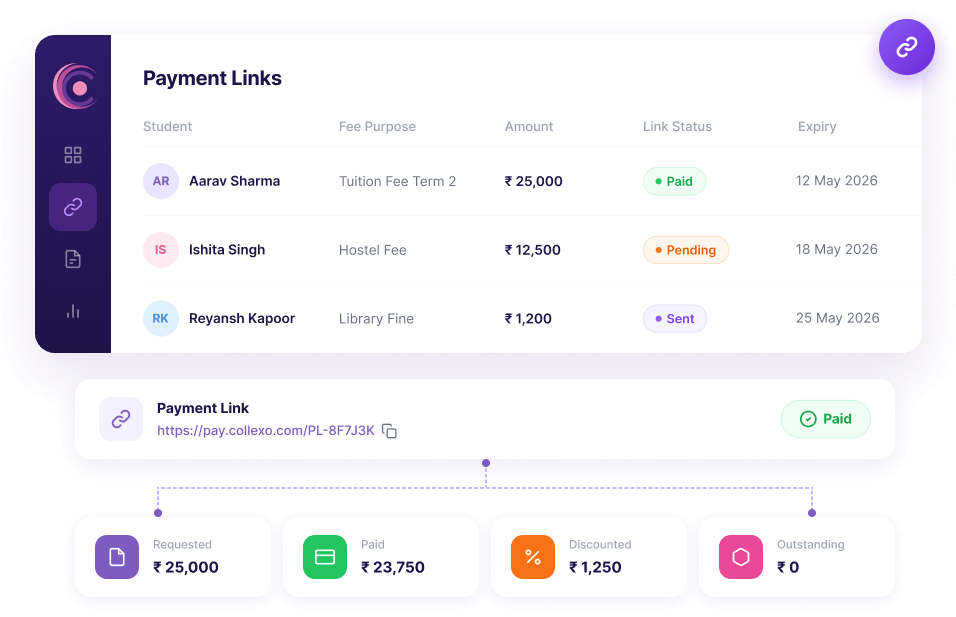
From fee request to payment status, without separate trackers.
Choose the fee and student, generate the payment link, share the request and track the outcome in the same workflow.
Choose what you need to collect
Start from a fee already assigned to the student, or create a one-off request for another institutional charge.
Payment request details
Student foundAdd the student, amount and payment details
Find the student using an application, enrolment or admission number, then add the payable amount, instructions and expiry date.
Payment link setup
Complete the admission fee payment before the link expires.
Generate a trackable payment link
Create a unique payment URL for the request. Use the single or split payment-link workflow available in Collexo for your collection setup.
Payment link generated
ActiveShare a clear payment request
Send the link through the channel your team uses. Students or parents can see who the fee is for, how much is due and any instructions before they pay.
Complete the admission fee payment before the link expiry date.
Track paid, pending and outstanding amounts
See the amount requested, paid amount, balance, discount, expiry, payment date, creator and source from one view.
Less payment chasing. More collection clarity.
Give students a direct way to pay while admissions and finance teams see exactly which requests are complete and which still need attention.
Give students a direct way to pay
Turn an existing student fee or a one-off institutional charge into a shareable payment link.
Reduce payment confusion
Keep the student, fee purpose, amount and instructions together in the same payment request.
Focus follow-up where it matters
Use payment status, expiry and outstanding balance to identify requests that still need attention.
Keep a complete payment history
Retain creation dates, payment dates, source and ownership details for every payment link.
One payment-link workflow across the student journey.
Collect application, admission, tuition and other fees across schools, colleges, coaching institutes, EdTech and multi-campus organisations.
Application and admission fees
Send a payment request connected to the right applicant, programme and admission record.
Tuition and school charges
Collect assigned fees or create separate requests for transport, activities and other charges.
Course and batch fees
Create payment links for programme fees, batch payments and additional learner charges.
Programme and certification fees
Share a ready-to-pay request for the right learner, programme or certification.
Centralised payment-link management
Monitor link creation, ownership, source, payment status and balances across teams and locations.
Outstanding fee follow-up
See the total requested, amount paid, discounts, charges and balance still payable from one view.
A payment link your teams can actually track.
Collexo keeps every request connected to the student, fee and payment outcome, so teams do not have to match links and records manually.
One fee collection system. More ways to get paid.
Use Payment Links alongside online checkout, EMI, AutoDebit, dynamic QR and offline collections while keeping fee records in one institutional payment workflow.
Questions about payment links for student fees.
Clear answers about creating, sharing and tracking payment links with Collexo.
What is a payment link for student fee collection?
A payment link is a unique URL that an institution shares with a student or parent to collect a specific fee. In Collexo, the link stays connected to the student, fee purpose, payable amount, instructions and payment status.
How do I create a payment link for student fees?
Select an existing fee assigned to the student or create a one-off fee request, verify the student details, enter the amount and instructions, set the link status or expiry, and generate the payment URL.
What types of fees can I collect with a payment link?
Institutions can create payment links for application, admission, tuition, programme and other student fees. In the product, a fee already assigned to the student is shown under Configured Fees (Allocated), while a separate one-off request is created under Miscellaneous Fees.
Can a payment link be connected to an application or admission number?
Yes. Collexo can connect the request to an application, enrolment or admission number along with the student’s name and contact details.
What are single and split payment links?
Collexo provides separate workflows to manage Single Payment Links and Split Payment Links. The available split-link setup depends on the collection workflow configured for the institution.
Can I add payment instructions to the link?
Yes. Teams can add payment notes while creating the link, and those instructions are displayed to the student or parent on the checkout page.
Can a payment link have an expiry date?
Yes. Teams can add an expiry date and use the link status to distinguish active requests from links that are no longer valid.
What can teams track after creating a payment link?
Teams can view the total requested amount, paid amount, discount, amount still payable, payment date, fee purpose, payment status, expiry date, creation date, creator, source and generated URL.
Is Collexo only a payment link generator?
No. Collexo generates shareable payment links, but it also keeps each request connected to the student, fee purpose, amount, expiry and payment status within the institution’s fee collection workflow.
Make student fee requests easier to pay and easier to track.
Give students a direct payment route while keeping every request and payment outcome visible to your team.