
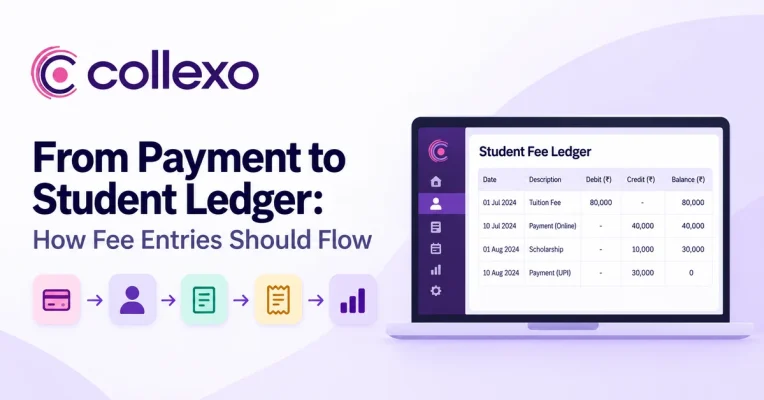
A student fee ledger should tell finance much more than whether a student has paid.
It should explain what the student was charged, what they paid, which fee the payment cleared, what balance remains and what changed afterwards.
However, this process often breaks between payment and ledger.
A parent pays ₹40,000 online. The gateway shows Successful, but the student’s fee record still shows ₹40,000 outstanding. Finance then downloads the transaction report, identifies the student, checks the fee and updates another system.
The money moved in seconds.
The financial record took much longer to catch up.
That gap is what good fee posting should remove.
A stronger flow looks like this:
Fee due → Payment received → Student identified → Fee mapped → Ledger updated → Receipt generated → Settlement tracked → Reconciled
The goal is not simply to automate entries. Instead, every step should preserve the financial context behind the transaction.
What is a student fee ledger?
A student fee ledger is the running financial record of the fees charged to a student and the payments, concessions, refunds and other changes that affect their balance.
For example:
| Date | Entry | Fee Due | Payment / Adjustment | Balance |
|---|---|---|---|---|
| 1 Jul | Semester 1 Tuition | ₹80,000 | ₹80,000 | |
| 10 Jul | Online payment | ₹40,000 | ₹40,000 | |
| 1 Aug | Scholarship adjustment | ₹10,000 | ₹30,000 | |
| 10 Aug | Online payment | ₹30,000 | ₹0 |
The ledger provides something a payment confirmation cannot.
It shows how the student’s balance reached its current position.
For instance, a gateway may tell finance:
₹40,000 payment successful
Meanwhile, the student fee ledger should explain:
₹40,000 received from this student → applied to Semester 1 Tuition → balance reduced from ₹80,000 to ₹40,000
The second record gives finance the context it needs.
Payment ledger vs student fee ledger
The terms can overlap. However, it helps to separate them.
A payment ledger mainly focuses on transaction activity. It may include the amount, payment mode, reference, status, settlement and refund information.
A student fee ledger, on the other hand, focuses on the student’s financial position.
So:
Payment ledger = What money moved?
Student fee ledger = How did that movement change what this student owes?
Both views matter. More importantly, they should stay connected.
Fee posting connects the payment to the ledger
Fee posting is the process of applying a payment or adjustment to the correct student fee record.
Suppose a ₹25,000 payment succeeds.
Before posting, the system may only know:
Payment ID: TXN584021
Amount: ₹25,000
Status: Successful
After proper fee posting, finance should be able to see:
Student: Aarav Mehta
Fee: B.Tech Semester 3 Tuition
Instalment: Instalment 1
Amount due: ₹40,000
Amount posted: ₹25,000
Remaining: ₹15,000
Transaction: TXN584021
Receipt: Generated
The money has not changed.
However, the record now explains what that payment means.
How should a payment flow into the student fee ledger?
A reliable payment-to-ledger workflow has several steps.
Each one adds context that finance may need later.
1. Start with the fee demand
The ledger process begins before the payment.
First, the institution needs a clear record of what the student should pay.
For example:
Student: Diya Shah
Programme: MBA
Fee head: Semester Tuition
Amount due: ₹60,000
Due date: 15 September
Instalment: 2 of 4
This creates the destination for the eventual payment.
Without the fee demand, the institution may know that money arrived but not what the amount should reduce.
Therefore, payment automation should not begin with the gateway.
It should begin with a correctly structured fee record.
Explore Collexo Fee Management
2. Capture the payment with a clear reference
Once the student pays, the system records the transaction.
A useful payment record can include:
- payment amount,
- transaction date,
- payment mode,
- transaction reference,
- payment status,
- student identifier where available, and
- payment source.
The transaction reference is especially important.
A parent saying:
“I paid ₹30,000 yesterday.”
may not provide enough information to identify the exact payment.
By contrast, a unique reference gives finance a clear route back to the transaction.
3. Identify the correct student
Next, the system needs to answer:
Who paid?
This can become difficult when the payer and student are not the same person.
For example, a bank transfer may come from a parent’s account. Similarly, a generic payment link may lose student context unless the payment journey captures it.
Therefore, the student identity should remain connected to the transaction wherever possible.
Collexo’s reconciliation model maps payments to the relevant student record, fee head, payment source, settlement batch and ledger.
As a result, finance has less manual identification work after payment.
4. Map the payment to the right fee
Identifying the student is only half the job.
Finance also needs to know:
What did the student pay for?
Suppose one student has:
Tuition due: ₹40,000
Hostel due: ₹25,000
Examination fee: ₹5,000
A ₹25,000 transaction arrives.
Which balance should change?
The system should not simply assume.
Instead, the payment journey should carry the intended fee context or follow clear allocation rules.
Then finance can post:
Hostel Fee → ₹25,000 paid → ₹0 remaining
rather than reducing the student’s total balance without explaining which fee was cleared.
5. Update the student fee ledger
Once the payment is identified and mapped, the ledger can change.
Before payment:
| Fee | Due | Paid | Balance |
|---|---|---|---|
| Tuition | ₹60,000 | ₹0 | ₹60,000 |
After a ₹25,000 payment:
| Fee | Due | Paid | Balance |
|---|---|---|---|
| Tuition | ₹60,000 | ₹25,000 | ₹35,000 |
The student fee ledger should now reflect the new balance.
At the same time, the ₹25,000 entry should remain connected to the original payment.
Finance should therefore be able to move from:
Student ledger → Payment
and back from:
Payment → Student ledger
without manually searching.
Collexo’s internal product workflow connects each successful collection to the relevant student, fee head, instalment, receipt, ledger and settlement.
6. Connect the receipt to the same payment
A receipt is another view of the same financial event.
If the ledger shows:
₹25,000 payment posted
the receipt should refer to that payment too.
Ideally:
Payment → Ledger Entry → Receipt
stay linked.
Consequently, a parent asking for an old receipt does not require finance to rebuild the payment history from separate records.
7. Keep settlement separate from fee posting
This distinction is important.
A student paying successfully and the institution receiving the settlement are different stages.
Suppose:
Student paid: ₹10,000
Posted to student ledger: ₹10,000
Settled to institution: ₹9,900
The student’s fee position reflects the payment they made.
Meanwhile, finance also needs to account for the settlement and any applicable charges.
Therefore, do not change the student’s payment to ₹9,900 simply because that was the bank settlement.
Instead, preserve both records:
Student payment: ₹10,000
Bank settlement: ₹9,900
Collexo tracks payment states including successful, failed, pending, settled, partially settled, refunded, reversed, disputed and unmatched.
Explore Collexo Fee Payment Reconciliation
8. Reconcile the payment
Later, finance should be able to compare all the connected records.
For example:
Student fee demand: ₹10,000
Payment: ₹10,000
Ledger posting: ₹10,000
Receipt: ₹10,000
Gateway transaction: ₹10,000
Bank settlement: ₹9,900
Applicable charges: ₹100
The numbers are not identical.
However, the difference is fully explained.
That is the purpose of reconciliation.
A good system does not force every amount to match blindly. Instead, it shows why amounts differ and whether those differences are expected.
Collexo’s reconciliation workflow connects student payments with fee heads, settlement batches, payment modes and ledger records. It can also connect payment and reconciliation data with ERP, SIS, accounting and enrolment systems.
What should a student fee ledger entry contain?
A useful ledger entry needs enough context to remain understandable later.
| Field | Why it matters |
|---|---|
| Student ID | Identifies whose financial record changed |
| Fee head | Shows what the entry relates to |
| Academic period | Connects the fee to the right term or session |
| Entry type | Distinguishes fee, payment, concession, refund, etc. |
| Amount | Records the value of the event |
| Transaction date | Shows when it happened |
| Payment mode | Identifies how payment occurred |
| Transaction reference | Links the ledger entry to the payment |
| Receipt reference | Connects the proof of payment |
| Balance after entry | Shows the student’s updated position |
| Status | Shows whether the related transaction succeeded or changed |
| User / update details | Supports traceability |
Not every institution needs the same field names.
However, a ledger entry should be understandable without relying on someone’s memory.
A worked student fee ledger example
Consider a student with a ₹1,00,000 semester fee.
The institution allows two instalments.
Starting position
| Entry | Fee Due | Payment / Adjustment | Balance |
|---|---|---|---|
| Semester tuition | ₹1,00,000 | ₹1,00,000 |
The student first pays ₹50,000 online.
After the first payment
| Entry | Fee Due | Payment / Adjustment | Balance |
|---|---|---|---|
| Semester tuition | ₹1,00,000 | ₹1,00,000 | |
| Payment TXN001 | ₹50,000 | ₹50,000 |
Later, finance approves a ₹10,000 scholarship.
After the scholarship
| Entry | Fee Due | Payment / Adjustment | Balance |
|---|---|---|---|
| Semester tuition | ₹1,00,000 | ₹1,00,000 | |
| Payment TXN001 | ₹50,000 | ₹50,000 | |
| Scholarship adjustment | ₹10,000 | ₹40,000 |
Finally, the student pays ₹40,000.
Final position
| Entry | Fee Due | Payment / Adjustment | Balance |
|---|---|---|---|
| Semester tuition | ₹1,00,000 | ₹1,00,000 | |
| Payment TXN001 | ₹50,000 | ₹50,000 | |
| Scholarship adjustment | ₹10,000 | ₹40,000 | |
| Payment TXN002 | ₹40,000 | ₹0 |
The ₹0 balance is useful.
However, the history behind that balance is even more valuable.
Therefore, the ledger should record financial events rather than repeatedly replacing the latest number.
What happens when a payment fails?
Not every payment attempt should update the student fee ledger.
Suppose a student attempts to pay ₹40,000, but the transaction fails.
The system can keep the failed attempt in the transaction history.
However, the student still owes ₹40,000.
So the ledger balance remains unchanged.
The payment history may separately show:
₹40,000 attempted → Failed
This distinction prevents a failed transaction from reducing the student’s dues.
What if a payment stays pending?
Pending payments require a similar rule.
A payment should not become final simply because the student started the transaction.
Instead, the system may need to wait until the payment provider confirms the result.
Until then, the pending transaction can remain visible without incorrectly closing the fee.
Once the status becomes successful, the ledger can update according to the institution’s configured workflow.
So:
Payment initiated ≠ Payment confirmed
What if the student pays only part of the fee?
Partial payments should reduce the balance without closing the full fee.
For example:
Fee due: ₹60,000
Payment: ₹25,000
Remaining: ₹35,000
The student fee ledger should keep those amounts connected to the same fee.
Otherwise, finance may end up with a ₹25,000 transaction that looks unrelated to the ₹35,000 still outstanding.
A connected record makes the relationship clear.
What if the student pays twice?
Duplicate payments need special handling.
Imagine a parent receives a slow confirmation screen and repeats a ₹30,000 payment.
Now the institution has:
Transaction A: ₹30,000
Transaction B: ₹30,000
but the fee due was only:
₹30,000
The system should not quietly create a negative balance without highlighting the issue.
Instead, finance needs to see that collected value exceeds the applicable fee.
The second payment can then enter the right review, refund or adjustment process.
This is why exception handling belongs inside the payment-to-ledger flow.
What if finance cannot identify the student?
An unidentified payment should not be posted simply to clear it from a report.
For example, a bank transfer may arrive with an unclear reference.
Until finance identifies the correct student and fee, the transaction may need to stay in an exception or suspense workflow.
Collexo’s reconciliation model helps reduce such unclear entries by mapping payments to the right student, fee head, payment source, settlement batch and ledger.
A good system should therefore make unmatched payments visible.
Do not hide the exception. Make it easy to resolve.
Refunds should create new ledger entries
Suppose a student pays ₹80,000.
Later, finance refunds ₹20,000.
The wrong approach is:
Original payment ₹80,000 → edit to ₹60,000
That removes the original history.
A better ledger shows:
| Entry | Amount | Effect |
|---|---|---|
| Original payment | ₹80,000 | Fee reduced |
| Refund | ₹20,000 | Later financial change recorded |
Now finance can explain both events.
This principle is also useful for auditability.
For companies to which Section 128 of India’s Companies Act applies, books of account must explain transactions and follow prescribed accounting requirements. The Companies (Accounts) rules also include audit-trail requirements for applicable companies using accounting software.
These requirements do not apply identically to every educational institution. Therefore, institutions should confirm their own legal and accounting obligations.
Still, the practical rule is useful:
Preserve the original event. Record the correction separately.
Companies Act, 2013 on India Code
A student fee ledger is not the general ledger
This distinction matters.
The student fee ledger records the student’s fee position.
The institution’s accounting general ledger serves a wider accounting purpose.
For instance:
Student fee ledger:
Student A → ₹40,000 tuition paid
The accounting system may translate that event into the institution’s chart of accounts and formal books.
Therefore, institutions should not assume that updating a student balance automatically completes every accounting requirement.
Instead, the systems should connect in a controlled way:
Student fee record → Payment → Reconciliation → Accounting entry
Collexo’s supported integrations can exchange student records, fee structures, payment status, receipts, outstanding balances, refunds, settlements, reconciliation data and accounting entries with ERP, SIS, finance and accounting systems.
Avoid posting the same payment manually in several systems
A common workflow looks like this:
The payment succeeds.
Then someone updates the fee system.
Later, another person updates the ERP.
Finally, accounts receives an Excel file and posts the same payment again.
Now three systems describe one transaction.
Besides creating extra work, every manual step introduces another chance for error.
Possible problems include:
- wrong student mapping,
- incorrect fee head,
- duplicate posting,
- missed posting,
- different dates, and
- balances that no longer agree.
A better integration model decides which system owns each record and how information moves between them.
For example:
Fee system: student fee and balance context
Payment layer: transaction status and payment reference
Accounting system: formal accounting entries
The systems can then exchange the required information without making staff recreate the same event repeatedly.
The ledger should update quickly, but only on the right trigger
Real-time updates sound ideal.
Usually, they are.
However, speed only helps when the trigger is reliable.
Posting a failed transaction instantly is worse than posting a confirmed payment slightly later.
Therefore, institutions should define what event causes the student fee ledger to update.
For online payments, it may be confirmed transaction success.
For counter payments, it may be payment confirmation.
Bank transfers may require identification or verification before posting.
So the goal is not:
Update as fast as possible.
It is:
Update as soon as the financial event is reliable enough to post.
Students and finance should see the same balance
One of the clearest signs of a broken workflow is when different systems show different balances.
The student portal says:
Outstanding: ₹20,000
Finance sees:
Outstanding: ₹50,000
Meanwhile, the payment gateway shows:
₹30,000 successful
Now everybody has to investigate.
A connected payment-to-ledger flow should prevent this gap.
Students and finance teams may see different levels of detail.
However, both should work from the same underlying financial position.
Exception handling matters as much as automation
No system will resolve every payment automatically.
There will always be exceptions.
For example:
- unidentified payments,
- duplicate payments,
- partial payments,
- failed transactions,
- pending payments,
- reversed transactions,
- refunds,
- amount mismatches, and
- settlement exceptions.
Instead of hiding these cases inside a large transaction list, finance needs a clear exception workflow.
A useful exception record should explain:
What happened?
Which payment or student is involved?
Why could the system not post it automatically?
Who needs to review it?
What happens after resolution?
The operating principle is simple:
Automate the normal path. Make the unusual path obvious.
How finance teams can test the payment-to-ledger flow
Take ten recent student payments.
For each transaction, try to answer:
Who was the student?
What fee did they owe?
How much did they pay?
When did the payment become successful?
Which ledger entry did the payment create?
What balance remained afterwards?
Which receipt belongs to the payment?
Did the transaction settle?
Was it reconciled?
Did anything change later?
Then run the same test backwards.
Start with a student fee ledger entry and locate the original payment.
If either direction requires multiple spreadsheets, manual searches or help from another team, the financial chain is weaker than it should be.
What should institutions look for in student fee ledger automation?
Do not evaluate software only on whether it has a ledger page.
Instead, test the complete process.
Can the system connect a payment to the correct student?
Does it know which fee or instalment the payment belongs to?
Will partial payments update the remaining balance correctly?
Does a failed payment leave the fee open?
Can finance see payments that could not be posted automatically?
Are receipts connected to the payment entry?
Do refunds preserve the original history?
Can payment and ledger records connect with settlement and reconciliation?
Can the right information sync with ERP or accounting systems?
Most importantly:
Can finance trace one payment from fee demand to final financial record?
That is the real test.
From payment received to financial record complete
A successful payment should not start a manual finance process.
Instead, it should complete one important stage of a connected financial flow.
The ideal sequence is:
Fee created
→ Student pays
→ Payment confirmed
→ Student identified
→ Correct fee mapped
→ Ledger updated
→ Receipt connected
→ Settlement tracked
→ Payment reconciled
→ Relevant accounting information synchronised
The student fee ledger sits at the centre of this process because it shows how every financial event changes the student’s position.
When the workflow works well, finance spends less time asking:
“Which student does this payment belong to?”
and more time focusing only on the transactions that genuinely need review.
That is the real value of automating fee posting.
Automate ledger updates
Collexo connects fee payments with the relevant student, fee head, payment source, settlement batch and ledger. It can also connect payment and reconciliation data with ERP, SIS, accounting and enrolment systems, helping institutions reduce duplicate financial updates.
Explore Collexo Fee Payment Reconciliation
Frequently asked questions
What is a student fee ledger?
A student fee ledger is a running record of fees charged to a student and the payments, concessions, refunds, adjustments or other financial events that change the student’s balance.
What is fee posting?
Fee posting is the process of applying a payment or financial adjustment to the correct student fee record. Proper posting identifies both the student and the fee or instalment affected.
What is the difference between a payment ledger and a student fee ledger?
A payment ledger mainly records transaction activity such as amount, date, payment mode and status. In contrast, a student fee ledger connects those transactions with fees due and the student’s resulting balance.
When should a payment update the student fee ledger?
The ledger should update when the institution has a reliable financial event to post, such as a confirmed successful payment. Failed or unresolved transactions should remain separate until their status becomes clear.
Should a failed payment appear in the student fee ledger?
A failed transaction may remain in payment history, but it should not normally reduce the student’s amount due because a successful payment did not occur.
How should partial payments appear in the student fee ledger?
The ledger should show the amount paid and the remaining balance against the same underlying fee. For example, a ₹25,000 payment against ₹60,000 due should leave ₹35,000 outstanding.
How should refunds be recorded?
A refund should remain linked to the original payment while appearing as a later financial event. This preserves the original transaction history instead of rewriting it.
What happens when a payment cannot be matched to a student?
The payment should move into an exception or suspense workflow until finance identifies the correct student and fee. It should not be posted to an unrelated ledger simply to clear the transaction.
Is a student fee ledger the same as an accounting general ledger?
No. A student fee ledger tracks the student’s fee position, while the general ledger supports the institution’s formal accounting records. The two systems can exchange information, but they serve different purposes.
Can student fee ledger updates sync with ERP or accounting software?
Yes, depending on the platform and configured integrations. Collexo can connect payment and reconciliation information with ERP, SIS, accounting and enrolment systems, including payment status, outstanding balances, refunds, settlements and accounting information.